

Losing data can be painful. It literally hurts. Therefore, it is always great to back up your data especially when WhatsApp is the ultimate mode of conversation for aplenty. The greatest advantage of backing up your WhatsApp data is that you can load WhatsApp on a new device from where you left off.
If you are an Android user, WhatsApp will back up your data by using Google Drive just like it uses iCloud for iOS.
How do I back up my WhatsApp data on Android?
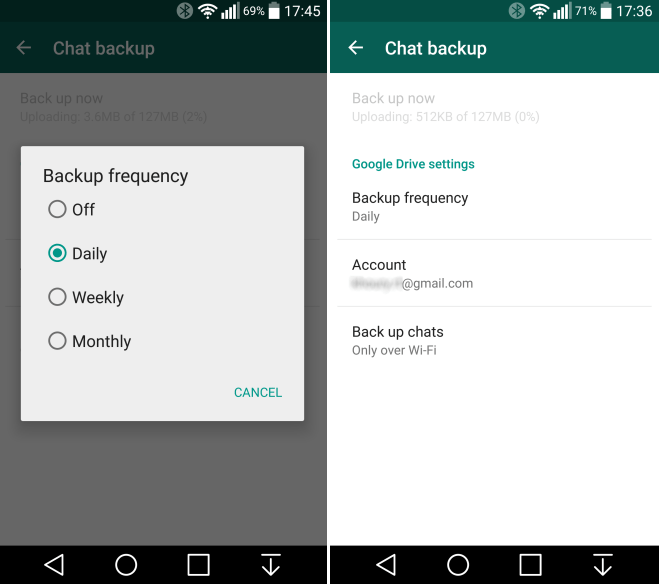
Fortunately enough, WhatsApp saves and backs up your chat history to your device’s memory automatically. However, you can also back up your chat to Google Drive depending on your phone’s settings. By doing so, you will not lose your data even if you delete the app from your phone and reinstall it.
Following are the steps to help you in backing your data with Google Drive:
- Open WhatsApp’s application on your device
- On the top right corner of your device’s screen, tap on to the Menu Icon [indicated as three vertical dots]
- Click on Settings
- Tap on Chats and then Chat Backup


- Click on Back up to Google Drive
- Choose the frequency (daily, weekly, monthly) with which you would like your data to be backed up
- Select the Google Account you want to back up
- Give the necessary permission by clicking on Allow
- If you want to save your videos too, tap on Include Videos
- Tap on Back Up to begin your backup


Congratulations! Everything is now backed up with Google Drive. The chats can be restored in case your device is lost or broken. Remember, you can switch from Android to Android and not to iOS and vice versa.
Also Read: How to back up your WhatsApp data on iCloud [iPhone]?
How do I restore my data from Google Drive?
Well, the process is quite simple. Following are the steps:
- Launch WhatsApp on your device and tap on Agree and Continue
- Enter your phone digits for verification
- Click on Next and Ok
- Tap on Continue and Restore
- Mention your Name and click on Next
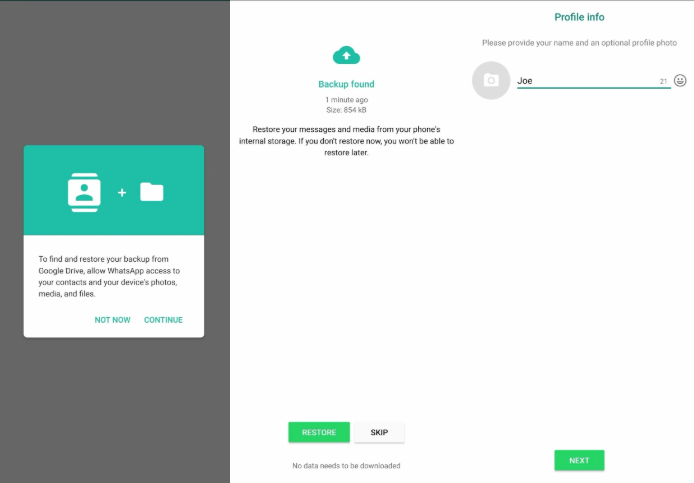

And now you can access your WhatsApp data on any Android device. All you need is to sign in with the same account you backed your data with.
Images source: Androidcentral