

You know the feeling. You spent hours working on a school paper or a report for your boss only to find your file suddenly missing. Did you delete it by mistake? Did it get lost in a software crash? Maybe something got corrupted? Heck if you know. But you want it back.
Fortunately, if you ever find yourself in this position, you’re not out of luck. There are tools available that can help you recover lost files. The EaseUS Data Recovery Wizard is one such tool.
EaseUS Data Recovery Wizard Summary
EaseUS claims their software can help users:
- recover accidentally-deleted files;
- retrieve savable data after hard drive damage;
- recover data from freshly-formatted disks;
- recover files after a virus or related attack on your system;
- find lost files after you’ve emptied your computer’s recycle bin;
- access data after an OS crash;
- recover data from lost or RAW partitions.
Free vs Premium
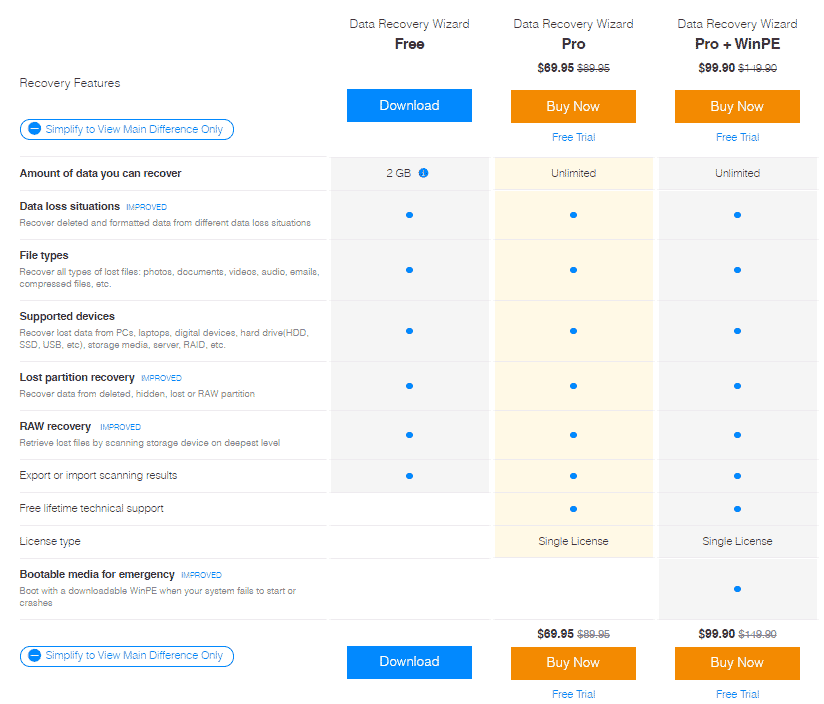
The EaseUS Data Recovery Wizard is available in both free and premium versions. If you only need to recover a few files, download the free version and it should be more than enough.
As you can see in the pricing chart below (accurate as of publication), the free version will allow you to recover up to 2 GB of data.
Note: When I say “up to 2 GB,” that limit depends on you sharing it with your Facebook friends or Twitter followers. If you opt not to do that, you can still restore up to 500 MB of data.
If you need a more robust solution, there are two premium options available:
- Data Recovery Wizard Pro
- Data Recovery Wizard Pro + WinPE
Both Pro options offer unlimited data restoration and lifetime technical support. The difference is the Pro + WinPE version includes downloadable bootable media so you can get to your data if your system crashes and can’t otherwise start.
Note: We were given access to a Pro license for testing purposes for this review.
Software Highlights

I ran two tests – a simple .docx document (shown in the screenshot above), and I created a larger .iso from an old DVD. They were deleted, emptied from the recycle bin, and the software found them both quickly. They both restored without issue.
On top of that, I browsed through some of the other files found, and was able to recover some lost family photos that disappeared a couple of years ago, much to my delight. So the tool worked well even when deletions weren’t recent.
Overall, there’s a lot to like about the EaseUS Data Recovery Wizard. For example:
- Fast crawl times on SSDs (250 GB took under 5 minutes)
- Significantly slower HDD crawl times (about 2.5 hours for a 1 TB drive), but files are searchable and restorable before crawling finishes;
- Remarkable amount of lost or deleted data becomes discoverable;
- Restoration was quick and easy, even with a 4 GB file test;
- Quick access if you know the file name via the search tool;
- Even files and photos deleted years ago turned up and were restored with ease.
Final Verdict on the EaseUS Data Recovery Wizard
This isn’t the first file recovery tool I’ve used, having lost everything from precious photos to important manuscripts over the years. And I must admit, I’m impressed. This tool was easy to set up, intuitive to use, and quite effective.
You can’t go wrong with the EaseUS Data Recovery Wizard. Download it for free to see what lost and deleted files you can restore today.